[Next] [Previous] [Up] [Top] [Contents] [Index]
6 The Workbench objects
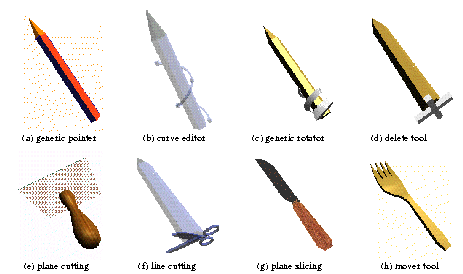
The most generic tools, provided with the Workbench toolkit (Figure
3), can be included in an application by a line of two of code. One
example is the rotator, which controls the orientation of the objects by
a 'rubber-band' interaction scheme. While the button is down, the selected
object rotates to follow a 'rubber' string between its the centre C and
the stylus tip, each step being a rotation in the plane formed by C and
two successive stylus positions. Intuitively, the feel is 'reach in and
turn it about its centre'. An alternate version adds scaling ('turn it
and pull it larger'), which is very useful when seeking an improved view
of a detail. Equally general are the volume of interest box (allowing examination
and zooming of a limited region, unobscured by surrounding material), the
6DOF mover ('stick a fork in it'), the tools to specify/modify/delete points,
curves, or surfaces, and measurement tools. A general purpose memorizing
tool that can record user input for later autonomous replay (convenient
when making monoscopic videos of interactions for which the user's stereo
perception is crucial).
Figure 3. Examples of manipulators
Other tools apply to narrower classes of application, such as those
that manipulate the display of volume data (such as MR and CT scans) by
changing transfer function and opacity, or govern segmentation, surface
extraction, and so on; a fully comprehensive toolkit would cover all volume
data formats, but at present we support only the one most commonly used
by CI
Finally, some applications require custom tools. For example, it is helpful [13] to confine a display of tagged cardiac MR to an ellipsoidal volume of interest; choosing a particular ellipsoid involves specifying up to nine degrees of freedom, requiring a somewhat specialized tool. The toolkit facilitates the development of application-specific tools, allowing the programmer to attach selection and object-object communication easily to objects with new behaviours ('bend when pushed', 'be cut by a Scalpel tool', 'visualize tumour destruction by radiation focused here') that require simulation computations within the objects.
[Next] [Previous] [Up] [Top] [Contents] [Index]
Generated with Harlequin WebMaker