[Next] [Previous] [Up] [Top] [Contents] [Index]
7 Medical application examples
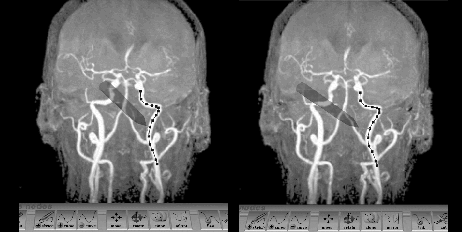
Figure 5. The Virtual Workbench 3D curve editing tool (stereo pair, cross-eyed). Upon stereo fusion one sees the arteries as translucent, with the 'hand-held' stylus showing through them.
Medical images of such branching structures as blood vessels are clear to the human visual system, but easily confuse computer vision programs. The tube finder [16] provides an intuitive, hand-eye coordinated, reach-in interface that allows the user to sketch central curves for arteries, nerves, etc., detectable in volume data and in 3D space, and have this position/shape estimate refined by active contour methods (Figure 5). The editor enables the intuitive creation, modification and deletion of 3D curves by means of the interactive tool.
The user creates curves as 3D splines by sketching them with 3D stylus motions, matched to the different tubes visible in the stereo maximum intensity images. One can later edit these curves, viewed from the same or another direction, to achieve better matches. (Errors in depth perception can thus be corrected from a side view.) Editing primitives include sketch a curve, add/delete curve, move control points, cut, link, clone, move, mirror, rotate a curve.
[Next] [Previous] [Up] [Top] [Contents] [Index]
Generated with Harlequin WebMaker