[Next] [Previous] [Up] [Top] [Contents] [Index]
6.2 Selectors: Widgets
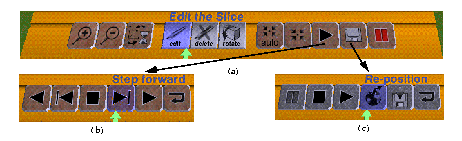
The toolrack becomes active when the stylus moves into its bounding box. As the user moves the stylus over it, the button nearest the tip is highlighted, and the rack displays above it an expanded text about its function (Figure 4a), enabled by clicking. Placing the toolrack in virtual space to coincide with the material Workbench surface makes it easier to hit the buttons quickly, by preventing overshoot. However, since the toolrack is a 1D row of buttons, a constrained slider device (or the mouse) in the non-dominant hand is often more convenient.
Figure 4. The Tool Rack. Hierarchical sub-menus.
A subordinate set of buttons can take over the rack (among them a 'return' button to restore the status quo ante). In Figure 4a the third from the right enables the heartbeat control toolrack of Figure 4b, while the button on its right enables the recording buttons in Figure 4c.
[Next] [Previous] [Up] [Top] [Contents] [Index]
Generated with Harlequin WebMaker